

Composite materials don’t behave the way metals do, and that single fact causes more design headaches in engineering teams than almost anything else. A steel bracket behaves roughly the same in every direction.
A carbon-fiber panel doesn’t. Its strength changes depending on fiber orientation, the manufacturing process, temperature, and even how the mold was filled. Predicting how a composite part will actually perform once it leaves the design screen has traditionally meant building prototypes, testing them, breaking them, and starting again.
This is where Digimat software helps engineers get past that guesswork. Digimat, a material modeling and simulation platform from e-Xstream Engineering (part of MSC Software within Hexagon), was built specifically to shorten that loop.
It predicts how composites, polymers, and other multiphase materials will behave before a single part is manufactured. For engineers working in automotive, aerospace, and consumer products, that’s the difference between guessing and knowing.
This post breaks down how Digimat software helps engineers simulate composite materials in practice, how it fits into a daily workflow, and why it matters for anyone designing with composites today.
Why Composite Materials Are Hard to Simulate
Traditional finite element analysis (FEA) tools were built around isotropic materials – materials with uniform properties in every direction. Composites don’t play by those rules. A short-fiber reinforced plastic part, for example, will have fibers aligned differently near the mold gate than near the edges, purely because of how the material flowed during injection molding. That means the same part can be stiffer in one region and weaker in another, even though it’s made of the same raw material.
If an engineer runs a standard FEA simulation and assumes uniform material properties, the results can be badly wrong – sometimes optimistic, sometimes not, but rarely accurate. This is exactly the gap Digimat was designed to close.
What Digimat Actually Does
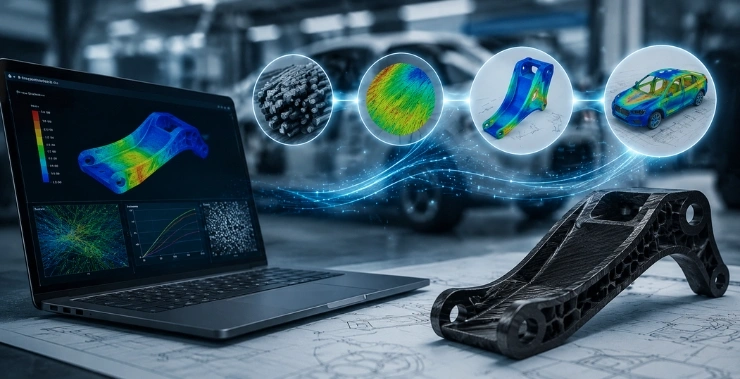
Digimat works at the micromechanical level. Instead of treating a composite as one averaged material, it models the individual phases – the fibers, the matrix, any fillers or additives – and calculates how they interact at a microscopic scale. It then translates that behavior into properties that can be fed into a full-scale structural simulation.
In practice, this happens through a few core capabilities:
Digital Materials Laboratory – Engineers can characterize a material’s behavior virtually, reducing how much physical testing is needed. Instead of manufacturing dozens of test specimens to understand how a material reacts under different loads, much of that characterization can happen in software first.
Multiscale Simulation – This is the heart of Digimat. It connects three things that are usually treated separately: the manufacturing process, the resulting material microstructure, and the final part’s mechanical performance. So instead of simulating strength in isolation, engineers can see how injection molding parameters, fiber orientation, and load response are all linked.
Process-Aware Structural Analysis – Because manufacturing changes material behavior, Digimat can import data from process simulations (like mold flow analysis) and use it to inform the structural model. The simulation reflects how the part will really come out of the mold, not an idealized version of it.
Polymer Additive Manufacturing Support – For 3D-printed polymer and composite parts, print orientation and layer behavior significantly affect strength. Digimat helps engineers predict that behavior instead of running repeated physical print-and-test cycles.
How Digimat Software Helps Engineers Day to Day
For someone designing a composite bracket, housing, or structural component, this concretely shifts the process. Rather than:
- Design a part
- Build a prototype
- Test it
- Find out it fails somewhere unexpected
- Redesign and repeat
The workflow becomes:
- Design a part
- Simulate material behavior under real manufacturing conditions using Digimat
- Identify weak points and fix them virtually
- Build a prototype that’s much closer to final
- Validate with far fewer physical test cycles
That doesn’t eliminate physical testing – it shouldn’t, and no responsible engineering process would rely on simulation alone for safety-critical decisions. But it does mean fewer wasted prototypes, fewer late-stage surprises, and a shorter path from concept to a design that actually works.
Where This Matters Most
Digimat sees the heaviest use in industries where composites are chosen specifically for weight savings and performance:
- Automotive – lightweighting components to meet fuel efficiency and emissions targets without sacrificing crash performance
- Aerospace – predicting how composite structures behave under extreme load and fatigue conditions where failure isn’t an option
- Consumer goods – optimizing plastic and composite parts for durability and cost, especially in high-volume injection-molded products
In each of these, the underlying problem is the same: composite behavior depends on more variables than metal behavior does, and getting it wrong is expensive – in time, materials, or worse, in the field.
Digimat Within a Broader Simulation Workflow
One thing worth understanding is that Digimat isn’t usually used in isolation. It’s typically paired with other simulation tools – process simulation software to predict how a part fills and cures, and structural FEA solvers like MSC Nastran or Marc to run the final mechanical analysis. Digimat acts as the bridge, translating microstructural material data into inputs those solvers can use accurately.
This integration matters because a simulation is only as good as the material model behind it. A structural analysis run with generic, averaged composite properties will always be less reliable than one informed by an accurate micromechanical model of how that specific material actually behaves once manufactured.
Getting Started with Digimat
For engineering teams evaluating composite simulation tools, the practical questions usually come down to: what materials are you working with, what manufacturing process is involved, and what failure modes matter most for your application. Digimat’s value shows up clearly once those specifics are on the table, since the software is built to model material behavior in context rather than as a generic property lookup.
CreoTek Systems India LLP works as a Hexagon MSC value-added reseller in India, supporting Digimat alongside the rest of the Hexagon simulation suite – including Nastran, Marc, and Patran. If your team is designing with composites and wants to see how Digimat would apply to your specific parts and materials, CreoTek can walk through a demo or help evaluate whether it fits into your existing simulation setup.